Why people look for a Strava alternative
For a lot of athletes, Strava is simply where every workout ends up. If most of your time is spent on mountain paths rather than city loops, though, you probably want different things: a map that knows trails, peaks and huts, a planner for your next outing and comparisons that make sense on a 900-metre climb.
Then there is the price question. According to Strava's official pages, full segment leaderboards, drawing your own routes, saving routes for offline use and advanced workout analysis are part of the paid subscription, while recording and the community are available without one (as of September 2026 – sources are listed under the table below).
Peakflow was built around exactly those points. It is not a copy but an independent app focused on the Alps, and everything described on this page is free to use.
What you get in Peakflow – at no cost
A tour feed with trail context
Every activity shows its map, photos, elevation profile and the peaks and huts along the way, plus the weather at the time you were out and nearby trail closures. Others can give you Peaks – Peakflow's version of a like.
Flows and leaderboards
Sections between huts, cols, lift stations and summits, created automatically. Ranked by time and by Bergmotor, a climbing-efficiency score.
Ghost runner
Repeat a route and your earlier self runs alongside – in the app's navigation and as a line on your Garmin watch.
Head-to-head and intervals
Replay two efforts on the same loop against each other on the map. Interval sessions are detected automatically.
Garmin data field “Peakflow Live”
Available in the Connect IQ Store. It sends your position during the activity; afterwards the tour appears in your feed on its own.
Planning and voice navigation
Routes on real trails for hiking, trail running and cycling/MTB, spoken turn instructions and offline maps in the app.
Peaks, huts and buses
More than 36,000 peaks, huts with opening hours and public transport connections built into route planning.
Race calendar
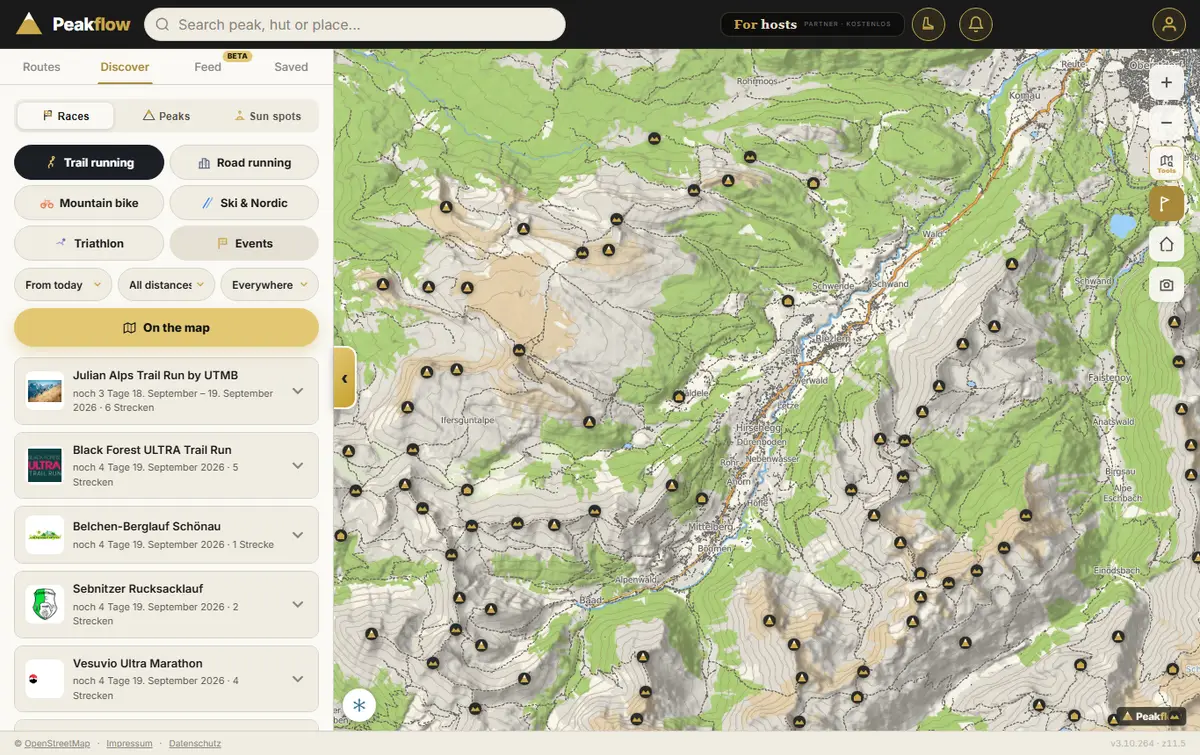
Trail running, road running, mountain bike, ski & cross-country and triathlon events, with courses on the map.
Flows: the mountain take on segments
A flow runs from one meaningful point to another – say from a lift station up to a col, or from a hut to the summit above it. Peakflow derives these sections from the trail network by itself, so nobody has to draw them. They come as climbs, descents and rolling sections, each colour-coded on the map.
Whenever your track covers a flow, you are ranked. Besides pure speed, Peakflow scores the Bergmotor (German for “mountain engine”): your climbing output relative to effort, taking heart rate, body weight and age into account. A steady, strong climber can top that list without going all-out every time. Found a flow you like? Tap once to follow it yourself.
Race your past self
When you plan a route you have done before, Peakflow looks up your earlier tours on the same line. During navigation a ghost runner then keeps you company, showing how many seconds you are ahead of or behind that previous effort. Paired with the Garmin data field, the gap shows up as its own line right on your wrist.
Back home, the tour page lets you put two efforts on the same loop head-to-head: two dots race each other along the track while the split times sit side by side. Did an interval session – five hill repeats on the same slope, for example? Peakflow spots the repetitions, lists them in a table and lets them compete against each other.
Garmin: tours arrive by themselves
Garmin users install the data field “Peakflow Live” from the Connect IQ Store and link it once with a six-character code. From then on it sends your position while an activity is running, and the finished tour lands in your Peakflow feed without any extra step. You can share a live link so friends and family can follow you, and the watch shows short hints such as the next peak ahead.
No Garmin? Record straight from the Peakflow app, or import what you already have.
Bring your whole Strava archive
Years of activities are worth keeping. Under the GDPR (Article 20, right to data portability) you can ask Strava for a copy of your data, and Peakflow reads that archive. It does not connect to your Strava account and never asks for your Strava password.
- Request your archive: on a computer, open strava.com → Settings → My Account → request your archive. Strava emails you a download link.
- Download the ZIP and leave it zipped.
- In Peakflow, choose Import → Strava and select the file. The archive is read in your browser; only the activities are uploaded, photos optionally.
- Pick a year or everything. If it stops halfway, choose the same ZIP again later and it carries on.
The same works for the Garmin Connect data export (all activities as FIT files) and for Apple Health (every workout with a recorded route). Single GPX, FIT or TCX files can be added too. Imported tours count in your feed, profile and flows. A free Peakflow account is required for importing.
Peakflow and Strava side by side
Only points that can be checked on Strava's own pages are listed here. Which app suits you better depends on what you do outdoors.
| Feature | Peakflow | Strava (according to Strava) |
|---|---|---|
| Record activities | free (app, Garmin data field) | without subscription |
| Community feed | free (beta) | without subscription |
| Full leaderboards | free (flows) | segment leaderboards with subscription |
| Plan your own routes | free | with subscription |
| Use routes offline | free (offline maps) | with subscription |
| Deeper analysis | free: Bergmotor, head-to-head, intervals | advanced analysis with subscription |
As of September 2026. Offers may change at any time. Sources: strava.com/subscribe · Strava Help Center: What Features Are Included in a Strava Subscription?
Privacy you control
Each tour can be public or visible only to you. In your profile settings you can keep your heart rate private and hide start and finish – applied to all tours, including older ones. Deleted tours wait 30 days in the trash in case you change your mind.
To be fair: Peakflow is an independent one-person project focused on the Alps, where maps, peak and hut data are most detailed. The feed is still labelled beta. Peakflow is not connected to Strava and does not sync with your Strava account – you can happily use both.
Frequently asked questions
Is Peakflow really free?
Yes. Peakflow is free, with no subscription and no ads – in the browser and as an app for Android and iOS. There is no paid tier.
Can I move my Strava activities to Peakflow?
Yes. Request your data archive from Strava (your right to data portability under the GDPR), then pick the ZIP file in Peakflow under Import → Strava. All activities with a GPS track come across, photos too if you like. No Strava login is needed.
Does Peakflow have segments like Strava?
Peakflow has flows: automatically generated sections between landmarks such as huts, cols, lift stations and peaks. Every flow has a leaderboard by time and by Bergmotor, a climbing-efficiency score.
Do I need a Garmin watch?
No. You can record tours in the Peakflow app or import them. With the Garmin data field Peakflow Live, tours also arrive automatically from your watch.
Is Peakflow affiliated with Strava?
No. Peakflow is an independent project with no connection to Strava. Your tours come in through your data archive, in-app recording or the Garmin data field.
Who can see my tours and heart rate?
You choose per tour whether it is public or only visible to you. In your profile you can keep your heart rate to yourself and hide start and finish – for all tours.
Try it in a minute
Open the map, plan a route, find a race – no sign-up needed. Create a free account for the feed, flows and imports.